Google Ads offline conversion tracking Dubai campaigns can reveal a problem that ordinary cost-per-lead reports miss: a form submission is not the same as a suitable sales opportunity, and a WhatsApp button click does not prove anyone actually sent a message. For Dubai businesses with sales teams, those distinctions can change how advertising performance should be judged.
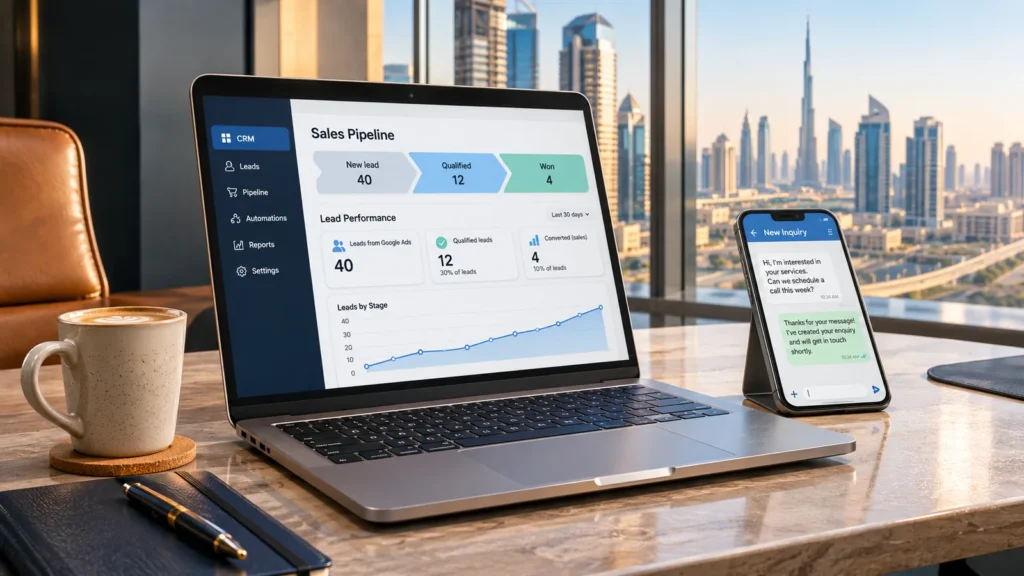
Imagine a fictional business-to-business service company in Dubai. Over a month, Google Ads records 40 enquiries. The sales team later confirms that 12 match the service, location and budget requirements, and four become customers. Optimising only for those initial 40 actions may reward a very different pattern of traffic from optimising for genuinely qualified enquiries.
Offline conversion tracking connects what happens after an ad interaction—such as a CRM lead being accepted, a consultation being booked or a deal being won—back to an eligible Google Ads conversion action. Google’s enhanced conversions for leads guidance explains how first-party lead information can improve matching between online enquiries and later sales outcomes.
This practical 2026 guide covers 12 steps for Dubai advertisers using website forms, sales calls, CRM systems and messaging. It distinguishes real outcomes from clicks, explains the newer Google Ads Data Manager approach, and shows how to validate uploads without inventing campaign results. Any numbers below are hypothetical; matching, reporting and Smart Bidding performance are never guaranteed.
Google Ads offline conversion tracking Dubai: where to begin
Before installing anything, define four separate events: interaction (someone clicks an ad or call-to-action), received enquiry (a real form, message or call reaches the business), qualified lead (the sales team confirms a relevant prospect), and converted lead (the prospect completes the outcome your business values, such as a signed contract or sale).
These are not interchangeable. A click on a WhatsApp link does not prove a conversation began, and a genuine enquiry can still be unqualified. Offline conversion measurement is useful precisely because the advertising platform cannot always see what happens in your sales pipeline. For the click-versus-message distinction, see the GWS guide to tracking real WhatsApp enquiries from Google Ads.
Some businesses can track completed purchases directly on their websites. Others sell through calls, proposals and CRM follow-up. Choose the implementation that matches the real sales process rather than copying an ecommerce purchase-tag configuration into a B2B lead campaign.
Step 1: Decide what a qualified lead means for your business
For Google Ads offline conversion tracking Dubai campaigns, begin with written qualification rules. A Dubai commercial fit-out company might require a business customer, an address within its service coverage, a relevant project type and an actionable timeline. An equipment supplier might qualify on product requirements, procurement authority and the ability to deliver to the requested location. These are illustrative criteria, not universal rules.
Ask the sales team which reasons they use for marking enquiries as unsuitable: wrong service, outside the delivery area, unreachable contact, job application, competitor, insufficient information or a project that is not ready yet. Keep a separate nurture category for genuine but early-stage buyers; they should not automatically be treated as spam.
Write a one-sentence rule for each event you intend to import. For example, “Qualified Lead: verified contact, relevant service, within coverage and accepted for follow-up.” The definition must be applied consistently by the team. If the rule changes every week, Google receives an inconsistent signal and comparisons become unreliable.
Step 2: Audit existing conversion actions before adding new ones
Open Google Ads conversion goals and list every action currently recorded: form submissions, phone calls, WhatsApp clicks, booking completions, offline qualified leads and won customers. Note the source, goal category, owner account, counting method and whether it is primary or secondary.
Check for duplication. A single completed form might fire a Google tag, a Google Analytics event imported into Ads and a thank-you-page conversion. Those should not automatically count as three separate business opportunities. Equally, a button click and a later CRM qualification are different stages, so do not combine them under an ambiguous event name.
Google’s conversion goals guidance explains that primary actions can contribute to bidding when the campaign uses that goal, while secondary actions are generally for observation. Do not switch everything to primary to improve a dashboard score. Decide which outcome the campaign should eventually optimise towards and retain earlier actions for diagnostic reporting where useful.
Step 3: Verify real form, phone and messaging enquiries reach your team
A successful tag does not prove the sales team received an enquiry. Submit a test form through an actual landing page and check the confirmation, server or email delivery, CRM record and assigned owner. Repeat for important mobile forms. Inspect hidden fields and consent controls, especially where forms are embedded or handled by a third-party provider.
For calls, confirm that the configured call reporting or CRM workflow identifies the actual call outcome rather than treating every tap on a telephone link as a connected conversation. For WhatsApp, store a received conversation or qualified CRM event only where you can genuinely verify it. A WhatsApp click log is useful interaction data, not proof of message delivery.
Give every received enquiry a unique internal lead ID so later stages can be linked to the original record. Test duplicate submissions, invalid phone numbers, unreachable contacts and follow-up ownership. These operational checks are as important as pixels. Our Google Ads landing-page guide covers the website side of a reliable lead journey.
Step 4: Capture suitable identifiers without exposing private data
Google Ads can associate eligible offline events with earlier advertising interactions through supported click identifiers, such as a GCLID, and through the first-party customer data used by enhanced conversions for leads. Which identifier is available depends on the interaction, consent, browser and implementation. Do not assume that every lead has a click ID or that every CRM record can be attributed to Google Ads.
Where appropriate, preserve valid advertising click identifiers in first-party session storage or form fields and carry them into the CRM alongside a unique lead ID and accurate timestamps. When a user provides an email address or telephone number through an eligible lead form, Google’s enhanced conversions setup can use normalised, securely hashed customer data for matching. Follow the platform’s documented tag or connector method rather than inventing your own data transmission format.
Do not put customers’ email addresses or phone numbers in public URLs, analytics page paths or ordinary query strings. Keep raw contact data inside properly secured business systems with defined access. Google’s enhanced conversions overview explains the use of SHA-256 hashing for eligible first-party data, but hashing does not remove the need for lawful collection and privacy controls.
Step 5: Build CRM stages that reflect verified sales outcomes
For offline measurement to work, your CRM needs more than a column labelled “lead”. A practical pipeline might be New → Contact attempted → Connected → Qualified → Proposal → Negotiation → Won / Lost. The important point is not the names but the team’s consistent use of each stage and the data recorded when a status changes.
Keep a lead ID, original source, creation timestamp, assigned employee, service interest, genuine contact information, qualification outcome and event timestamp. Where relevant, store an actual sale value and currency. Make it possible to distinguish an employee manually qualifying a lead from an automation merely marking it “contacted”.
Review integrations that copy form leads into CRM records: is the original click identifier preserved, does a phone number get reformatted, and does the same lead appear under multiple records? A real customer who sends two messages should not necessarily become two qualified-lead conversions. GWS’s CRM automation in Dubai guide explains the wider role of follow-up and ownership.
Step 6: Create distinct Qualified Lead and Converted Lead actions
Google provides dedicated lead-funnel conversion goal categories. A Qualified Lead usually reflects a prospect the business has vetted and accepted, while a Converted Lead can represent a later commercial milestone, such as a completed transaction. Google’s qualified and converted lead guidance describes these categories.
Set up the appropriate conversion actions for the real stages you intend to upload. The conversion name in a data feed needs to match the chosen action; timestamps should represent when the offline event actually happened, not simply when an integration ran. Decide whether the action should count once or multiple times for the same underlying opportunity, using Google Ads settings appropriate to your business.
Start with a single, consistently defined qualified stage if your team cannot yet verify closed revenue. Add a second converted-lead event when the corresponding CRM data is dependable. Avoid relabelling the same form submission as both events: separate actions should represent distinct milestones, not a way to inflate conversions.
Step 7: Configure enhanced conversions for leads on the website
Google recommends enhanced conversions for leads as an upgrade to traditional offline conversion imports. With an appropriate Google tag or Google Tag Manager setup, eligible first-party lead information collected on your website can support more durable matching when corresponding offline outcomes are later uploaded.
In your Google Ads account, review the current enhanced-conversions settings and customer-data terms. Google combined the enhanced-conversions-for-web and enhanced-conversions-for-leads setup under a unified setting during 2026, so older tutorials may show different menus. Identify the lead form fields genuinely collected, implement Google’s supported tag configuration and test that the event fires after the relevant interaction—not on every page view.
The Google Tag Manager implementation guide explains how to configure the user-provided data event and eligible lead fields. If your form is hosted in an iframe, redirects to another domain or uses a third-party builder, confirm how data is captured rather than assuming the standard setup works unchanged. Do not send unrelated personal data or circumvent consent choices.
Step 8: Connect the CRM through Google Ads Data Manager
For Google Ads offline conversion tracking Dubai implementations, this is a key 2026 technical change. Since 15 June 2026, new API-based offline conversion implementations must use the Data Manager API rather than starting a new Google Ads API upload integration. Some previously active Google Ads API integrations have transitional access; they should follow Google’s migration guidance rather than being described as universally broken.
For many advertisers, the starting point is the Google Ads Data Manager interface, not custom API code. Review the supported connections for your account and data source: these may include compatible CRM integrations, partner connectors or scheduled file-based workflows. Map fields such as conversion action, event time, lead identifier, matching data and any supported conversion value carefully. The exact connector and menu availability can vary.
Google explains the supported process in its Data Manager and enhanced conversions for leads guide. Developers creating a new custom upload system should follow the Data Manager API offline-conversions documentation, not a deprecated Google Ads API example. The Google Ads API migration warning explains the June restriction and legacy conditions.
Step 9: Check privacy, customer consent and secure data handling
Offline conversion imports can involve first-party email addresses, phone numbers, advertising identifiers and sales outcomes. Before sending such information, review your business’s lawful basis for collection and advertising measurement, website privacy disclosures, consent records where required, vendor agreements and retention procedures. The exact obligations depend on the customers, countries and laws involved; this article is not legal advice.
Google’s customer data policies require appropriate customer disclosures and consent where legally necessary. If a third-party CRM connector uploads data, verify its authorisation and contractual terms. Hashing supported fields is part of the technical design; it is not a substitute for legal permission or secure handling.
Restrict CRM and integration permissions to people and services that need them. Avoid placing personal information in public links or support screenshots. Test privacy preferences and consent handling before enabling uploads at scale, especially if the campaign reaches customers outside the UAE as well as in Dubai.
Step 10: Import a small test set and check for duplicates
After creating the conversion actions and data connection for Google Ads offline conversion tracking Dubai, test a small number of genuine, eligible CRM records whose outcomes you can verify. Record the lead ID, event name, original event timestamp and the upload result. Use the correct time zone and the format required by the connector; do not label every upload with the time the job ran.
Check that a test event maps to the intended Google Ads account and conversion action. Inspect missing identifiers, unmatched rows, timestamp problems, duplicate events and action ownership errors. A successful upload response only shows that data was accepted for processing; it does not by itself prove an event was matched to an ad or has appeared in reporting.
Use a stable internal event or order ID where supported to reduce double counting. If an integration retries the same sale, that should not become a second sale. Google’s offline-import guidelines explain timing, matching and deduplication rules. Do not backfill old records without checking Google’s applicable import windows and your data permissions.
Step 11: Review diagnostics before switching bidding goals
When running Google Ads offline conversion tracking Dubai campaigns, open the conversion action’s diagnostics after uploads begin. Review whether the account is receiving appropriate user-provided data, whether offline events are processed and whether Google reports quality or matching problems. Compare the diagnostic messages with the actual CRM records, not just with a spreadsheet row count.
Google provides an enhanced conversions for leads checklist and a separate diagnostics report. Common causes of missing results include mismatched conversion action names, incomplete lead identifiers, incorrect event dates, consent restrictions and events recorded outside the relevant window.
When data quality and volume are sufficient, consider making qualified or converted leads the primary outcome used for bidding while moving earlier proxy actions to secondary or observation-only as appropriate. Do not make this change on the day the integration starts and assume everything is ready. Google provides a recommended transition period when upgrading an existing offline import. Use the latest documented guidance and review campaign-level goals before changing automated bidding.
Step 12: Measure cost per qualified lead and optimise carefully
Once qualified outcomes are reliably recorded, compare campaigns by cost per qualified lead, qualified-lead rate, cost per won customer and, where defensible, revenue or profit. A lower cost per form submission is not automatically better if the leads cannot be contacted or do not match your service. Segment data by campaign, search intent, landing page, location and lead source.
In an illustrative Dubai services campaign with AED 4,000 spent, 40 submitted leads, 12 genuinely qualified leads and four won customers, the cost per submitted lead is AED 100, cost per qualified lead approximately AED 333, and advertising cost per won customer AED 1,000. These numbers are a hypothetical example, not client or industry benchmarks. They exclude sales salaries and other acquisition costs.
Use the findings to review negative keywords, message clarity, landing-page qualification and sales follow-up before automatically raising bids. A low-volume business may need a longer period of stable data before using later-funnel outcomes as its main Smart Bidding target. The aim of Google Ads offline conversion tracking in Dubai is better evidence for decisions, not a guarantee of cheaper customers.
Example: the same ad campaign viewed three different ways
Imagine two fictional Dubai lead-generation campaigns. Campaign A submits 100 enquiries, but only five are accepted by the sales team. Campaign B submits 30 enquiries, of which fifteen are qualified. If you report only enquiry totals, Campaign A looks stronger. If you report relevance, Campaign B has three times as many qualified opportunities despite fewer submissions.
This does not automatically prove Campaign B is more profitable. Advertising costs, sales value, conversion probability and follow-up costs still matter. It does show why a useful measurement stack separates ad clicks, real submissions, qualified opportunities and won customers.
For businesses still measuring only form views or WhatsApp button taps, begin by improving evidence of actual received enquiries. Import later-funnel events only when they exist as genuine, consistently recorded CRM outcomes. See our Dubai lead-generation guide for broader lead quality considerations.
A seven-day implementation and QA checklist
- Day 1: Write qualification criteria with the sales team and inventory existing conversion actions.
- Day 2: Verify form delivery, call records, messaging workflows and lead ownership.
- Day 3: Map lead IDs, appropriate advertising identifiers, first-party contact data and event timestamps into the CRM.
- Day 4: Configure separate Qualified Lead and Converted Lead actions, and review tag settings.
- Day 5: Check customer-data policies, consent and the supported Data Manager connection.
- Day 6: Send a controlled test batch, inspect diagnostics and correct mismatched or duplicate records.
- Day 7: Document the verified results and plan the bidding transition only when enough stable data is available.
This is a planning schedule, not a promise that all accounts will complete matching or accumulate enough qualified leads in a week. Google reporting and Smart Bidding decisions should be based on actual signal quality over time.
Frequently asked questions about Google Ads offline conversions
What is Google Ads offline conversion tracking?
It records eligible customer outcomes that happen after an ad interaction, such as a CRM-qualified lead or closed deal, and helps attribute them to Google Ads when matching is possible. It differs from simply counting a form view or ad click.
Can I import WhatsApp leads into Google Ads?
Potentially, if you have a genuine, lawfully collected enquiry and the required eligible identifiers and CRM data. A click on a WhatsApp button is not proof of a received message and cannot automatically be called a qualified lead.
Do I need a custom CRM or an expensive integration?
No universal system is required. Google Ads Data Manager supports appropriate connections and file-based workflows depending on your setup. Choose a method that preserves accurate event times, matching data and privacy protections; a custom integration may be justified for complex pipelines.
Should I still use the Google Ads API for new offline conversion integrations in 2026?
No. Since 15 June 2026, new API implementations must use the Data Manager API. Some established Google Ads API integrations have transitional access and should follow Google’s specific migration guidance rather than being assumed to work indefinitely.
Why are my offline conversions not appearing in Google Ads?
Possible reasons include processing delays, mismatched actions, unavailable identifiers, invalid timestamps, duplicate events, consent restrictions or conversion windows. Check the Data Manager and enhanced-conversions diagnostics rather than assuming a successful upload means every event matched.
Will importing qualified leads automatically improve campaign performance?
No. High-quality, sufficiently frequent and accurately matched signals can support measurement and bidding decisions, but results depend on data volume, targeting, offers, sales processes and campaign configuration. Validate the signals before changing bidding goals.
Build a measurement system that reflects real customers
Effective Google Ads offline conversion tracking in Dubai begins with a trustworthy definition of a qualified lead, clean CRM data and honest separation of clicks, received enquiries, accepted opportunities and customers. The technology then needs to transmit eligible outcomes through a supported, privacy-conscious integration.
In 2026, that means understanding Google’s Data Manager approach, enhanced conversions for leads, real-world consent requirements and the difference between accepted uploads and attributed conversions. Businesses that skip those checks can end up automating inaccurate reports.
Grow With Shuraim supports Google Ads management, lead generation and enquiry follow-up workflows. If you want a review of your conversion actions, CRM mapping and qualified-lead measurement, contact GWS about an advertising-tracking audit.