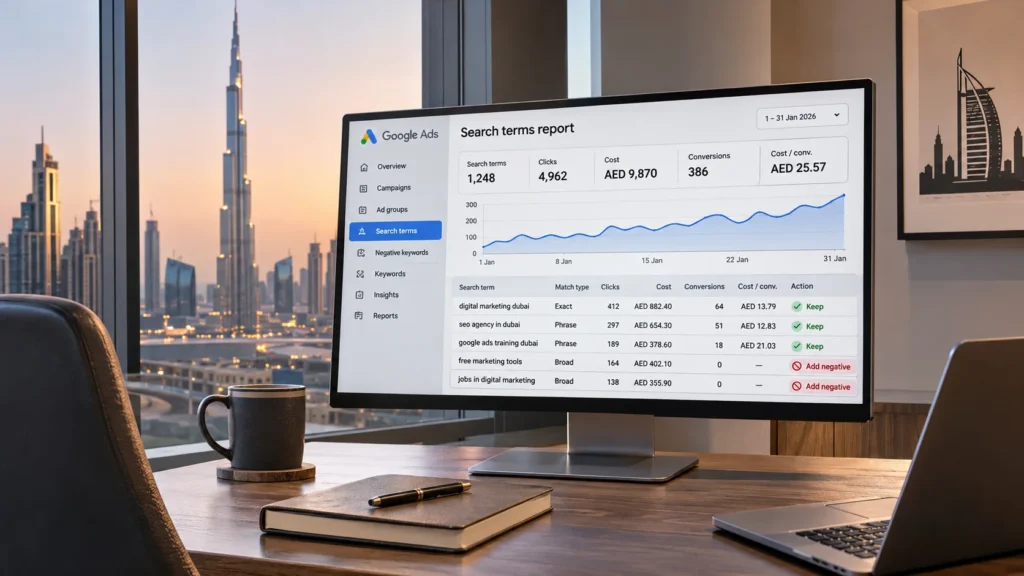
A practical, lead-quality-first audit for Dubai businesses using Google Search ads.
A Google Ads search terms report helps Dubai businesses understand what people searched before seeing their ads. Paying for clicks is easy. Paying for searches that could realistically become customers is harder. A Google Ads Search terms report helps Dubai advertisers see which searches triggered their ads, where budget is drifting and which phrases deserve closer attention. For a service business, the difference between “commercial fit-out contractor Dubai” and “fit-out jobs Dubai” is not just wording: it is often the difference between a potential customer and an unsuitable enquiry.
This guide explains how to audit a Google Ads search terms report in Dubai without treating every click without a conversion as waste. You will learn twelve checks, how to prioritise actions, how to choose negative keyword match types, and how to connect what people searched with what happened after the lead arrived. The examples are illustrative rather than account benchmarks. There is no universal safe cost-per-lead or negative-keyword percentage across Dubai industries.
Important limitation: Google does not display every individual query in the search terms report. Some are omitted for privacy or reporting reasons. Search terms insights can group additional demand into themes, but its categories and metrics are not a one-to-one replacement for the search terms report. Evaluate the visible evidence, conversion tracking and business outcomes together, not as a complete transcript of search activity.
1. Open the Google Ads search terms report and choose a meaningful date range
In Google Ads, open Campaigns → Insights and reports → Search terms. Interface labels may change, so use Google’s current Help instructions if your account looks different. Select the relevant Search campaign, then review a period long enough to contain useful click and conversion data. For an active account, the past 30 days is a sensible starting point; compare it with the previous 30 days where seasonality permits. A new campaign with only a handful of clicks needs more observation before sweeping exclusions.
Do not blend every campaign into a single conclusion. Keep branded searches, non-branded prospecting, different service lines and materially different target areas separate. A firm selling emergency plumbing services may receive urgent short queries; a B2B software supplier may need several interactions before a qualified lead appears. If the date range includes a website outage, tracking repair, major budget change or public holiday, annotate it. Otherwise you risk blaming keywords for an operational problem.
Action: save a baseline with dates, campaign names, click totals, spend, tracked conversions and any important changes. This gives your next audit a fair comparison rather than a vague impression of improvement.
2. Add the columns that expose real commercial performance
A list of search phrases alone is not an audit. Add useful columns such as impressions, clicks, cost, conversions, conversion rate and cost per conversion, where those metrics are available. Inspect the keyword and match type columns to understand why each query appeared. If you use conversion values or qualified-lead imports, examine the relevant value or conversion-action breakdown rather than assuming all recorded actions are equally valuable.
Be cautious with a blended “Conversions” figure. One account might count a submitted form as a conversion, while another counts a WhatsApp button click. Neither automatically proves that a potential client had a conversation, met the budget requirement or purchased. If the conversion column combines contact clicks with qualified opportunities, separate those outcomes before assigning blame or praise to an individual query.
Action: build a repeatable view for every audit. For a Dubai agency, useful working columns are search term, campaign, ad group, keyword, match type, clicks, cost, conversion action and lead status. Export the report if you need to reconcile with a CRM. Keep personally identifiable lead data outside any publicly shared report.
3. Flag searches with the wrong intent, not merely unfamiliar words
Read each visible term as a prospective customer’s request. Are they looking to buy the service, compare suppliers, learn a concept, find employment or obtain something free? For a Dubai office-cleaning company, “office cleaning contract Dubai” may fit; “office cleaner jobs Dubai” probably does not. For a website developer, “how to code a website for free” is usually a different audience from “Shopify developer Dubai quote”.
A useful triage system uses three labels: relevant, clearly irrelevant and needs evidence. Terms in the last group deserve an investigation before exclusion. “Best CRM for small business” might be research-only for one campaign but commercially valuable to a company selling CRM implementation. The landing page, offer and downstream lead quality change the answer.
Action: tag obvious job-seeker, tutorial, free-template and unrelated-product searches only when they genuinely conflict with the offer. Do not add blanket negatives such as “how”, “best” or “price” just because some informational terms underperform. Those words can appear in valuable commercial research queries.
4. Find expensive non-converting terms without inventing a universal threshold
Sort visible search terms by cost, then inspect terms with spending but no verified meaningful outcome. Cost alone is not enough. A high-value B2B contract may justify an expensive enquiry; a low-margin retail product may not. Start with your own target cost per qualified lead or acquisition, realistic conversion lag and the maturity of your tracking.
For example, suppose a campaign has a target qualified-lead cost of AED 250. A visible term costing AED 350 without any meaningful engagement warrants investigation, but not necessarily immediate exclusion: it might have had only a few clicks or be part of a longer buying cycle. A term costing AED 70 for unrelated job enquiries is a clearer waste signal despite lower spend. Do not mistake “zero recorded conversions” for evidence that the search could never produce a customer.
Action: rank terms by the combination of spend, demonstrated irrelevance, sufficient evidence and business impact. Investigate suspicious high-cost terms first, then check whether the underlying issue is the query, advertisement, landing page or conversion configuration.
5. Audit keyword match types and unexpected query expansion
Compare the search term with the keyword that triggered it and the search-term match type. These are different concepts: a keyword in your account is a targeting instruction, whereas a search term is what someone actually searched. Google can match eligible variants based on meaning, not only identical wording, so do not assume that phrase or exact match guarantees a literal text match.
Broad match may uncover useful demand, particularly when conversion measurement and bidding signals are robust, but it also needs scrutiny in campaigns with limited budgets or poor lead-quality data. Phrase and exact match can provide more deliberate coverage, yet neither removes the need for search-term reviews. Before changing the match type, inspect whether a small family of irrelevant queries is the issue, whether negative keywords would solve it, and whether an overly broad ad group makes the ad difficult to align with intent.
Action: document the triggering keyword and identify patterns, not isolated anecdotes. If one keyword repeatedly pulls unrelated service categories, consider restructuring or tightening targeting. Measure the result after changes rather than declaring broad match inherently bad.
6. Build negative keywords carefully at the right level
A negative keyword excludes searches according to its negative match type. Google’s negative matching behaves differently from positive matching; do not assume it automatically covers every synonym, singular, plural or close variant. A negative exact match is deliberately narrow, while phrase and broad negatives may block a wider set of queries. Inspect examples and check the likely effect before saving.
Decide where the exclusion belongs. An unrelated product might justify an account-wide exclusion if it is never sold. “Jobs” may belong in a shared list for several lead-generation campaigns. A service you offer elsewhere may need an ad-group or campaign-level negative, not a company-wide ban. Google notes that negatives added from the Search terms report to Search campaigns default to negative exact match, so confirm the match type and level when adding them.
Action: maintain a change log with the term, intended match type, applied level, reason and date. Cross-check valuable searches before broad exclusions. A mistaken negative can silently block qualified demand and make performance look worse after an apparently sensible clean-up.
7. Separate brand, competitor and comparison searches
Brand searches often produce different conversion rates and costs from generic prospecting. If your brand terms are mixed into a non-brand campaign, the blended average may flatter its apparent efficiency. Create reporting segments that show how much spend and how many qualified enquiries originate from people who already knew the business.
Competitor searches also need intentional handling. Someone searching another agency’s name might be comparing providers, seeking that company’s login page or looking for its support contact. A competing brand name is not automatically a negative and not automatically a good keyword. Consider relevance, ad message, legal and trademark considerations, landing-page honesty and actual lead outcomes. For example, “alternative to [competitor] CRM Dubai” may have different intent from the competitor’s employee portal.
Action: categorise visible queries as own-brand, competitor, generic service or other. Evaluate each against a comparable segment. Avoid treating a low-cost branded lead as proof that generic acquisition is performing equally well, and do not promise that all competitor-search traffic can be converted profitably.
8. Inspect Dubai location, language and service-area clues
Dubai campaigns can receive enquiries from people whose location, required service area or language differs from what the business serves. Search terms such as “office renovation Abu Dhabi” or “website developer in Sharjah” may be appropriate for a UAE-wide supplier but irrelevant to a Dubai-only service team. The right decision depends on your actual delivery coverage and campaign goals, not the appearance of a place name alone.
Check your campaign’s location-targeting choices alongside search-term evidence. Search wording is not a reliable substitute for the Google Ads geographic reports: a user in one city can search about another. Equally, a person may search in English, Arabic or another language and still be a suitable buyer. Do not infer nationality, purchasing power or lead legitimacy from language or name. Evaluate measurable service fit instead.
Action: group queries containing locations, neighbourhoods and language-specific phrases. Cross-reference geographic performance and confirmed serviceability. If you cannot fulfil an enquiry outside a defined zone, update targeting and messaging before excluding large sets of location terms blindly.
9. Check whether the ad and landing page answer the search
An apparently weak search term may be commercially relevant but poorly served by the advertisement or landing page. Someone searching “commercial fit-out quotation Dubai” needs clear information about the service, proof of relevant work and a straightforward way to request a quotation. Sending that visitor to a generic homepage creates friction, even if the keyword is perfectly targeted.
Review high-spend terms alongside the search ad, asset messaging and landing-page experience. Look for mismatched promises, missing pricing context where appropriate, vague calls to action, slow mobile forms, confusing navigation or an offer that attracts consumers rather than procurement teams. In Dubai’s service market, enquiries can arrive through a form, telephone or WhatsApp, so ensure the expected route is easy to complete on mobile.
Action: choose five relevant terms with disappointing outcomes and inspect their full journey before excluding them. GWS has a separate guide to improving Google Ads landing pages in Dubai if the query is right but the page is failing to convert.
10. Distinguish WhatsApp clicks from conversations and qualified leads
Many Dubai advertisers measure a WhatsApp button click because it is easy to track. That event is useful, but it does not prove a message was sent, received or answered. A visitor can open WhatsApp and abandon the conversation. In a search-term audit, a query appearing to generate five “leads” may actually have generated five button clicks and no genuine enquiries.
Agree on a lead-quality ladder: button click, confirmed message or enquiry, contactable prospect, qualified requirement, proposal and sale. Record which steps your technology can reliably measure. Use CRM records or a consent-aware messaging workflow to join those outcomes back to campaign data where technically supported. Avoid passing unnecessary personal information into advertising systems, and respect applicable privacy and consent obligations.
Action: examine search terms that generate many cheap micro-conversions but few genuine sales conversations. This is a stronger signal than simply penalising every low-conversion term. See the GWS explanation of WhatsApp clicks versus real Google Ads enquiries for the tracking distinction.
11. Review conversion quality and offline outcomes before optimising bids
Search terms that drive form fills may not be the same terms that generate qualified opportunities. If sales outcomes are available, compare the visible query patterns with CRM qualification rates and eventual revenue, not just on-platform lead counts. A campaign with thirty enquiries and fifteen suitable prospects can be more valuable than one with a hundred enquiries and five suitable prospects, even when the second campaign reports a lower cost per form submission.
Google Ads supports importing offline conversion data through supported approaches including Google Ads Data Manager, depending on the source and setup. Enhanced conversions for leads can help connect eligible first-party lead data to subsequent conversion outcomes when implemented correctly. This requires sound data capture, consent decisions, mapping, diagnostics and ongoing validation. It is not a switch that guarantees perfect attribution or restores search terms Google does not show.
Action: audit which conversion actions are primary, what each action proves and whether qualified outcomes arrive after a reporting lag. Before altering Smart Bidding, verify the signal quality. GWS’s offline conversion tracking guide for Dubai walks through the wider process.
12. Turn the audit into a weekly experiment and measure the result
A search-term audit should end in a short, prioritised change list, not a spreadsheet of red highlights. Record actions under four categories: exclude clearly irrelevant demand, restructure mismatched keywords or ad groups, improve relevant landing-page journeys, and fix inaccurate conversion measurement. Assign an owner and an expected effect to each item. A clean log makes it possible to reverse a negative keyword that later proves too restrictive.
Schedule a lightweight weekly review for active, meaningful-spend Search campaigns, then a more thorough monthly comparison. Lower-volume accounts may need a longer evaluation window. Compare relevant-query spend, qualified enquiries, cost per qualified lead and eventual pipeline outcomes with the baseline. Factor in seasonality, budget changes and conversion delays; short-term fluctuations are not proof that a change worked.
Action: choose the three biggest controllable problems and make measured changes rather than adjusting everything at once. Monitor for lost valuable impressions as well as reduced irrelevant clicks. If your business needs ongoing help, explore GWS’s PPC management in Dubai. The goal is not simply fewer clicks: it is better use of the budget you choose to invest.
A practical 30-minute audit workflow
Use this sequence as an operational starting point, not a guaranteed fix or universal duration. First, verify tracking and choose a date range. Next, sort visible terms by cost, distinguish clearly unsuitable searches from ambiguous ones, and identify the keywords responsible. Then review negative-keyword scope and match type, followed by the ad-to-landing-page journey for valuable searches that are not converting. Finally, cross-check genuine enquiry quality and document the changes you intend to test.
For reporting, keep a simple decision table with search term, intent category, spend, conversion evidence, downstream lead quality, decision, owner and review date. Do not publish client search data or contact details in an example. When the evidence is uncertain, mark the row for follow-up rather than automatically excluding it. This process protects both the budget and the useful demand that rushed clean-ups can accidentally remove.
Frequently asked questions
Where do I find the Search terms report in Google Ads?
Open Google Ads and navigate to Campaigns, then Insights and reports, then Search terms. Select the campaign and date range. Google may change menu wording; consult its current Help article for the latest route.
Does the report show every search that triggered an ad?
No. Google omits some individual queries for privacy and reporting reasons. Search terms insights provides grouped themes but is not an exact substitute for a complete query log.
How often should a Dubai business check search terms?
Weekly is a useful operating rhythm for active Search campaigns with enough spend to learn from. Very small or new campaigns may need a longer window. Also review after major targeting, budget or conversion-tracking changes.
Should I add every zero-conversion search as a negative keyword?
No. Check search intent, spend, click volume, conversion lag and lead quality first. A relevant expensive query may need a better landing page or more data, while a clearly irrelevant query can deserve exclusion sooner.
What is the difference between search terms and keywords?
Keywords are the targeting inputs you add to campaigns. Search terms are the actual queries associated with eligible ad impressions and clicks in Google’s reporting. The phrase shown can differ from the keyword that matched it.
Can search-term optimisation improve lead quality?
It can reduce exposure to visibly irrelevant demand, but query exclusions alone are not enough. Landing-page relevance, truthful ad copy, properly defined conversion actions and CRM feedback all affect whether enquiries become real customers.
Final takeaway
A good search terms report audit is less about collecting negatives and more about understanding why money is being spent. Keep relevant searches, remove obvious mismatches, improve the customer journey and use real lead outcomes to guide the next decision. Recheck the data after each meaningful change rather than assuming a tidy report automatically means a healthier business.
Official Google guidance and further reading
- Google Ads: About the search terms report
- Google Ads: Negative keyword ideas from the search terms report
- Google Ads: About search terms insights
Guidance checked for this 2026 article. Product interfaces, eligibility and reporting availability can change; confirm account-specific settings in Google Ads.